
Description
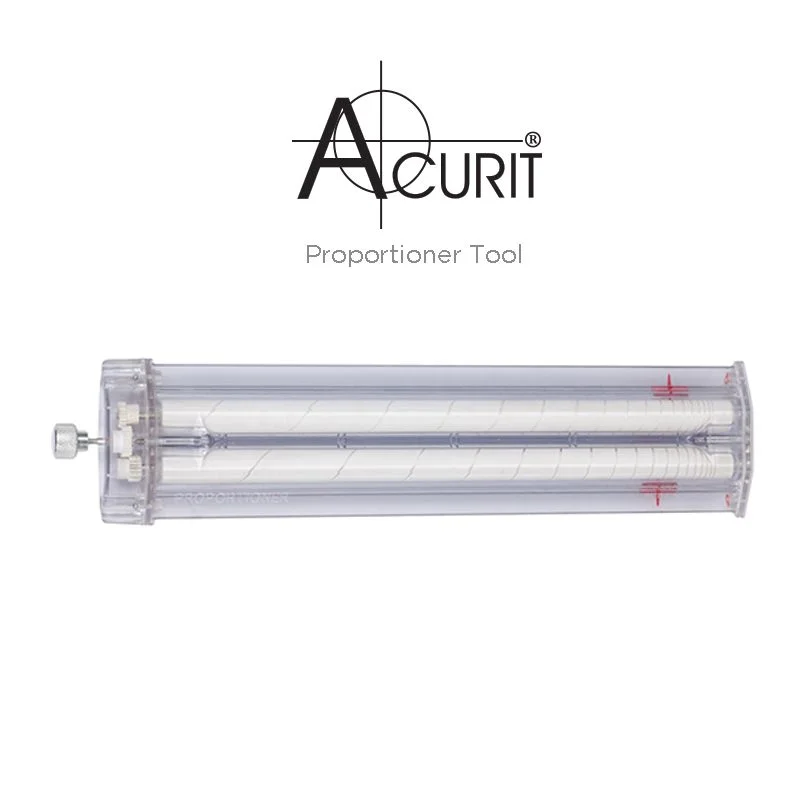
Acurit Proportioner Tool
No need to understand the mathematics behind proportions in order to use this ingenious tool: simply set the initial scale and let the Proportioner do the rest! Consisting of 2 indicators, one for the reference object and one for the transferred image, the Proportioner can be easily set to any proportion ratio by rotating the knob (without depressing) until the reference indicators line up with two fixed points, the eyes in a portrait image. Then depress and rotate the knob again to set the distance between the transfer indicators — how far apart you’d like the eyes to be in your drawing. The Proportioner will store this set proportion ratio for you, allowing you to easily transfer further points while retaining the exact scale!
Quickly resize images without sacrificing correct proportions
- Quickly resize images without sacrificing correct proportions
- Keep transferred images precisely to scale
- No math required
- Easily set initial scale by rotating knob to set indicators
- Proportion ratio is stored so further points can be transferred
- Great for working in the field
How to Use the Acurit Proportioner
- Select two key points on your reference (e.g., the distance between the eyes).
- Set the scale: rotate the knob to align the reference indicators.
- Size your drawing: adjust the transfer indicators to enlarge or reduce as needed.
- Keep proportions: the tool stores the ratio so you can transfer multiple points accurately.
- Mark and measure: use the tool to place points on your drawing—no math required.
- Go anywhere: lightweight and portable for studio or plein air use.
Reviews
There are no reviews yet.